 Kleepter
It starts in November. You spot the perfect scarf for your sister on one site, a board game for your nephew on another, and something your partner mentioned once in a shop you'll never find again. By mid-December the ideas are spread across forty open tabs, three shop wishlists and a camera roll full of screenshots.
This guide shows a calmer way to keep your Christmas gift list: how to keep track of gift ideas from different websites in one place, with the details you need to buy them. We'll cover why the usual methods fall apart in December, how to plan your gifts, and how to do it with a free Chrome extension called Kleepter.
Why gift ideas from different websites get lost
Christmas shopping is unlike the rest of the year. You're buying for many people, from many shops, over several weeks, and most of your best ideas come when you aren't ready to buy.
Ideas arrive at the wrong moment
You find the right gift while looking for something else. You aren't ready to check out, and you might want to compare it with a cheaper option, so you leave the tab open and hope.
Every shop keeps its own wishlist
Shop wishlists only hold that shop's products. Buy from six stores and you have six lists, each behind its own sign-in, and nowhere to see your Christmas gift list as a whole. (We wrote more about this in how to keep one wishlist across every online store.)
The details matter more than usual
A gift is only right in the right size and colour. A bookmark keeps a link but not the "Navy, size M" you carefully picked, and a screenshot keeps the picture but not the way back to the shop.
What a good Christmas gift tracker needs
Whether you use a notebook, a spreadsheet or an app, a list that survives December should do five things:
- Collect from any shop, big or small, so nothing sits outside the list.
- Keep the details: photo, name, price, the shop, and the size or colour you chose.
- Link straight back to the product page, so buying takes seconds.
- Be quick to add to, because you'll add dozens of ideas in short bursts.
- Stay private, because a gift list is the one list you don't want anyone to find.
| Method | Any shop | Keeps size & colour | Link to buy | Quick to add |
|---|---|---|---|---|
| Open tabs | Yes | Until closed | Yes | Yes |
| Shop wishlists | No | Sometimes | Yes | Yes |
| Bookmarks | Yes | No | Yes | Yes |
| Screenshots | Yes | In the picture | No | Yes |
| Spreadsheet | Yes | If you type it | If you paste it | No |
| Kleepter | Most shops | Yes | Yes | One click |
How to build your Christmas gift list with Kleepter
Kleepter is a free Chrome extension that saves products from online stores into one list, called My Kleeps. Here's how to use it for your holiday shopping.
1. Add Kleepter to Chrome
Install it from the Chrome Web Store and pin it to your toolbar. There's no account to create.
2. Pick the option, then Kleep it
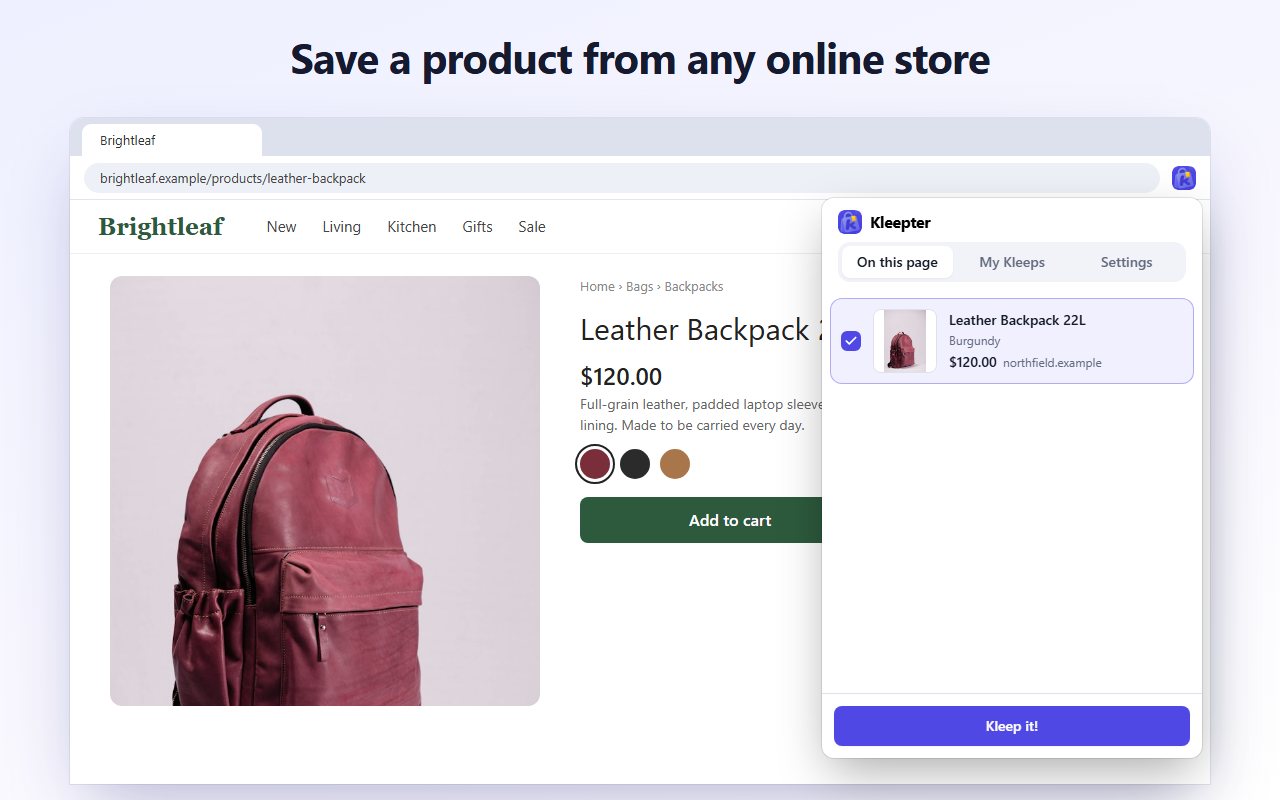
When you find a gift idea, choose the colour, size or version first. Then press Kleep it! on the small button that appears on the page. Kleepter saves the name, photo, price, shop and the option you picked.
3. Save several ideas at once
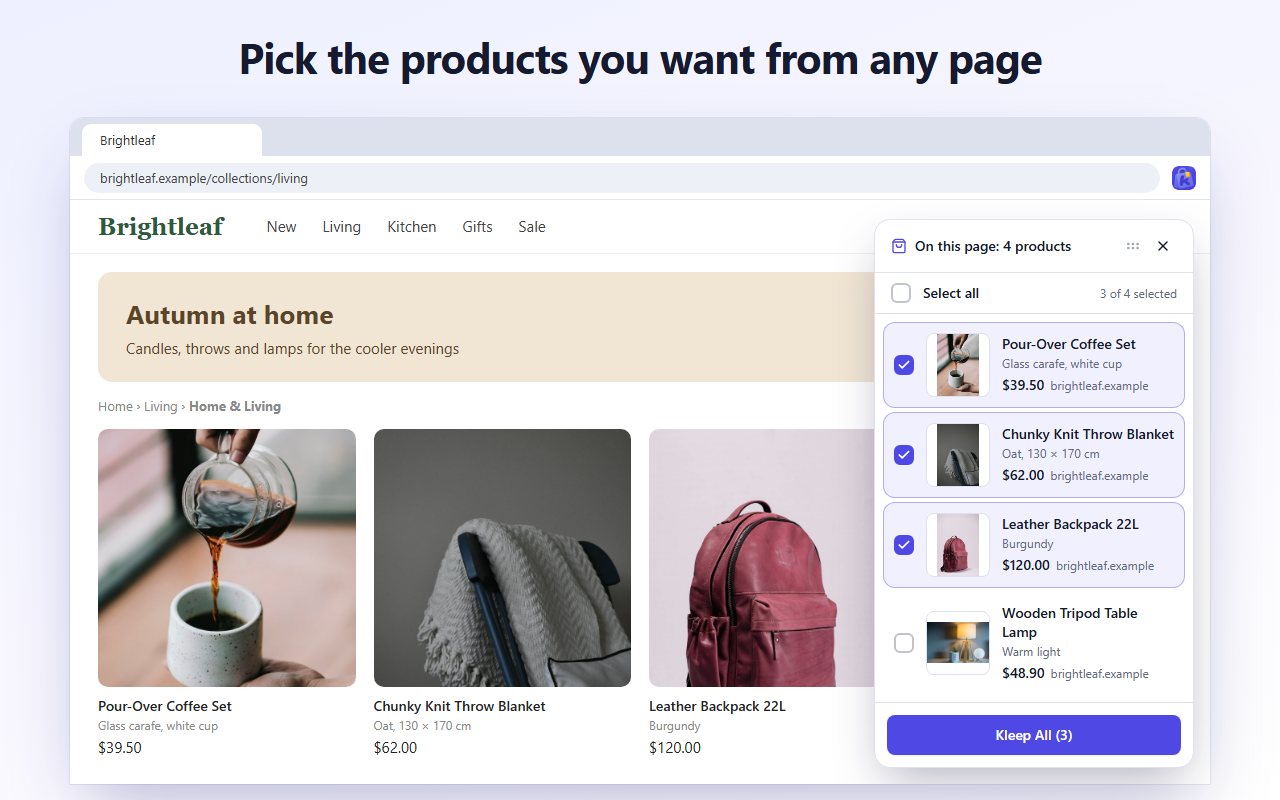
Browsing a gift guide or a search for "gifts for gardeners"? Tick the products you like, or Select all, and press Kleep All. It's the quickest way to shortlist now and decide later.
4. Review everything in My Kleeps
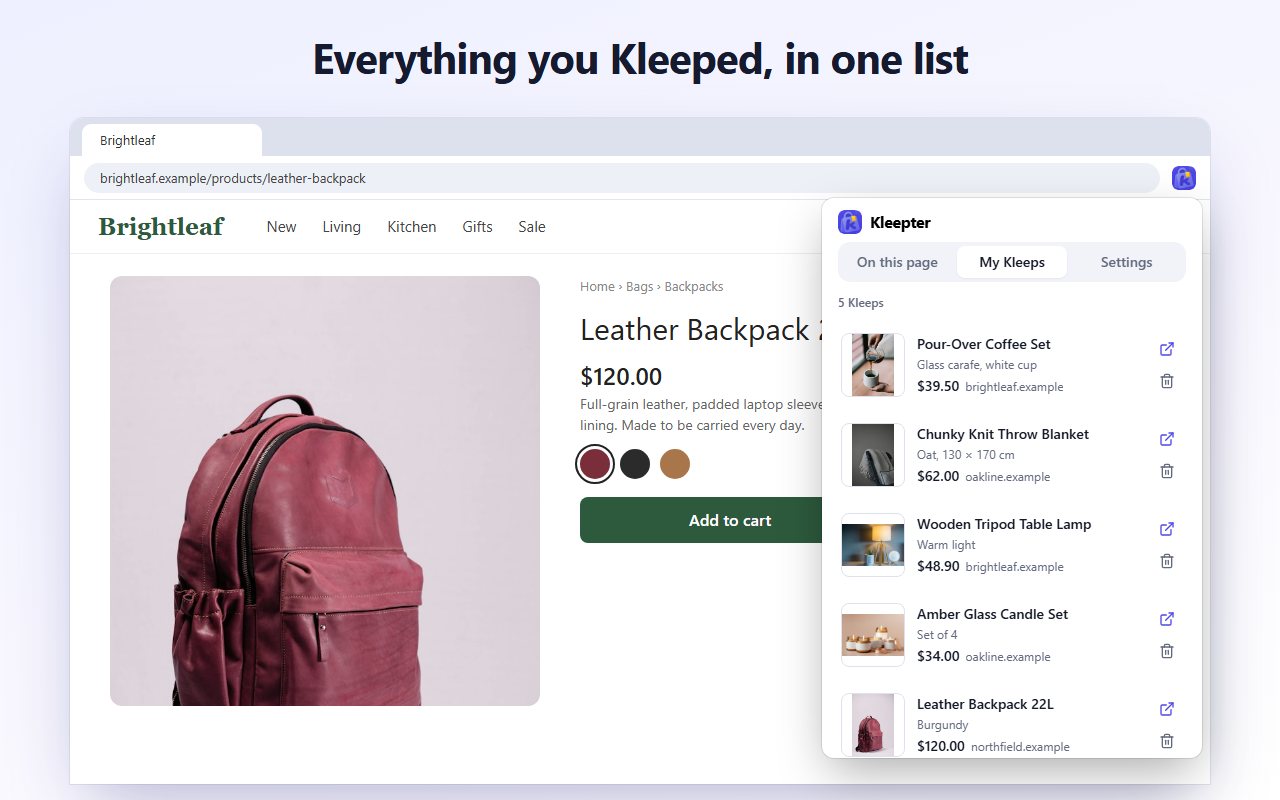
Click the Kleepter icon and open My Kleeps. Gift ideas from every shop sit side by side, which makes it easy to compare two jumpers from different stores or check what you've found for each person.
5. Buy from the shop, then Unkleep
Open a product's page straight from your list and buy it from the shop as usual. Kleepter never touches checkout. Once a gift is bought, Unkleep it, and what's left in your list is what you still need to buy.
Your gift list stays in your browser, on your device. Nothing is sent to a server, so your surprises aren't stored anywhere but your own computer.
Turning wishes into a shopping list
Christmas lists go both ways. Family members send you links to what they'd like, and you want to keep those wishes with your own ideas.
- Collect the links they send. When someone sends a product link by message or email, open it in Chrome and Kleep it. Their wish is now in the same list as everything else, with the photo and price.
- Keep your own wishlist too. Kleep what you'd like for yourself while you browse, so you have an answer when someone asks "what do you want for Christmas?" Open the product pages from My Kleeps and send the links.
- Keep the size they asked for. If a wish comes with a size or colour, pick it on the product page before you Kleep it, so it's saved with the product.
Holiday shopping tips that save time
- Start a list in November. Ideas you save early mean fewer panic buys after the last delivery dates. Check each shop's cut-off dates for Christmas delivery before you plan.
- Shop for one person at a time. Kleepter keeps one list, so finish one person's shortlist, buy, and Unkleep before moving on. Your list stays short and clear.
- Save first, decide later. Kleeping is free and takes a click. Save three options for a tricky person, compare them in My Kleeps, and Unkleep the ones you don't choose.
- Check prices before you buy. Your list shows the price from when you saved the product. Open the product page to see today's price before checking out.
- Use your own Chrome profile on a shared computer. Anyone using the same Chrome profile can open the extension, so a separate profile keeps the gifts a surprise.
FAQ
Can someone in my house see the gifts I've saved?
Your list is stored in Chrome on your device, never on a server. Anyone who uses the same Chrome profile on the same computer can open it, so if you share a computer, give yourself your own Chrome profile.
Can I make a separate gift list for each person?
Not yet. Kleepter keeps one list, My Kleeps. Each product keeps its name, photo, shop and the option you chose, and you can Unkleep a product once it's bought, so the list stays short.
Does Kleepter buy the gifts for me?
No. Kleepter never checks out or pays for anything. Every saved product links back to the shop's own page, where you buy it as usual.
Does it work on my phone?
Kleepter works in Google Chrome on desktop. Save your gift ideas while you browse on your computer, and buy from there too.
How much does Kleepter cost?
Kleepter is free, with no account and no sign-up.
A calmer December
The hard part of Christmas shopping isn't paying; it's remembering. Keep every gift idea in one list as you find it, with the size, colour and a link back to the shop, and December becomes a matter of working down the list. Add Kleepter to Chrome today and start your Christmas gift list while the ideas are fresh.